
Compliance
SMS and messaging compliance is highly regulated by countries. The applicable laws depend on the place of business, destination country of your recipients and the specific industry you are in. Telecom laws apply uniformly to any SMS sent in that particular country.
Businesses are required to obtain specific consent before messaging their prospects and customers. Each regulation such as Telephone Consumer Protection Act (TCPA), General Data Protection Rights (GDPR), Canada’s Anti-Spam Legislation (CASL), or California Consumer Privacy Act (CCPA), California or the new California law, makes it mandatory for each business to obtain specific consent. SMS Magic has created an extensive framework which serves as a guideline for you to define:
- Who are you messaging?
- What you are messaging and obtain specific consent for that content?
- How you are obtaining Consent?
There are several considerations in choosing your consent options. We advise you to consult your attorneys before deciding on the messaging consent.
- Choose a Consent Database
- Methods Of Input
- Configure Audit Database
- Configure Consent Method and Content
- Create Consent for Source
- Create Consent for Specific Content
- Edit Content Type
- Delete Content Type
- Configure Double Opt-In
- Create Double Opt-In Configuration
- Configure Keywords
- Configure Compliance Keywords
Choose a Consent Database
The applicable laws like TCPA and GDPR make it mandatory to obtain consent and keep records in a readily available audit database which can be used as evidence in case of a dispute. This database of Consent records needs to be maintained for 4 years (as per GDPR) from the date of its creation.
With SMS Magic you can choose how you obtain and maintain or record your consent. You can choose to get a blanket consent for sending any legally possible Content or get a specific Consent. For example, you can get blanket consent for sending any type of messages, service, transactional, or promotional; Or you can get specific consent for sending transactional messages only.
This specific consent is recorded via Sender ID and Content Type. You can choose any of the following methods:
- Mobile Number Only – You Opt-in to have a blanket yes or no consent for any recipient
- Mobile Number and Sender ID – You record consent for specific Sender ID’s. You always have the option to choose “All”, while creating your consent records.
- Mobile, Sender ID, and Content Type – You choose to do specific consent based on Content Type.

The compliance feature helps you create a consent database based on all these parameters. You can also enable users to create a consent record manually. However, users need to be provided with relevant permissions to create and update the consent database.
You can define consent record parameters in the following four possible combinations:
| Parameter | Description |
| Mobile Number | When you enable mobile number as a record parameter, all consent will be accepted only when responses are received through the default mobile number the customer provides. This is a mandatory parameter and will have to be included in every combination. |
| Mobile Number and Sender ID | When you enable this parameter, consent records will be registered when responses are received from the registered mobile number and by the defined sender ID of the customer. |
| Mobile Number, Content Type, and Sender ID | When you enable this parameter, consent records will be registered against responses received from the defined phone number of the customer, for a specified Content-Type sent to the customer, and by the Sender ID of the user. |
Methods Of Input
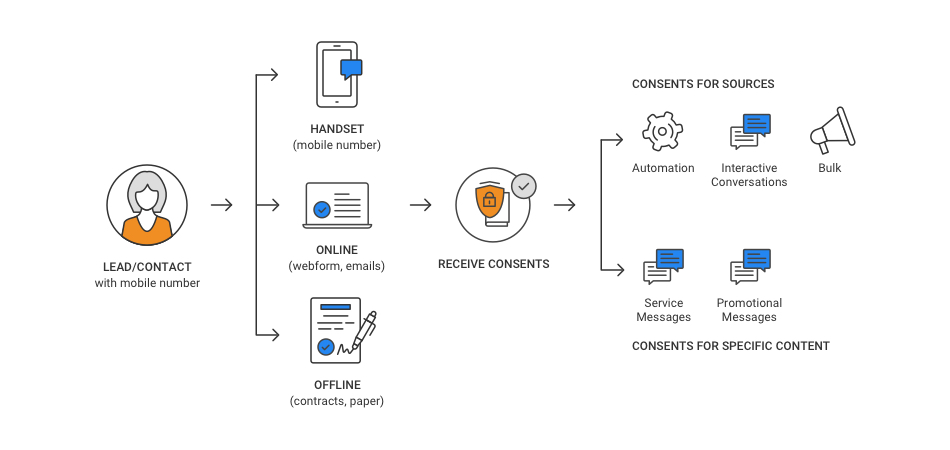
Consent is captured through text messaging, paper forms, emails or web forms. All these varied methods of input can be categorized under three areas. These are as follows:
Mobile – You can print the mobile numbers on billboards, posters or print ads in order to encourage customers to share their consent for receiving updates on your products and services. When customers send in their consent through these numbers, the input source is recorded as Mobile.
Online – All Web forms or partner sources sending in new lead information are considered as valid sources for collecting consent. However, it is recommended that you provide explicit instructions to customers to perform a specific action (like selecting a checkbox or clicking a Submit button) in order to submit their consent. Once submitted the database can record the input source as Online.
Offline – All physical forms like contracts or other paper forms can also be used to collect consent requests. Even for physical forms, you need to mention the specific action the customer needs to perform in order to send in their request. All requests collected through paper forms need to be added in the consent database with its input source as Offline.
Consent once captured in the consent database needs to mention the input source that has been used to collect it. Create a Comments field in the Consent object that will capture information on the input source for collecting the consent.
Similarly, the lead or Contact object record also needs to be updated with a custom field that will comprise details on how the record is being created. This is a recommended practice for maintaining the audit details.
To Configure the Audit Database:
1. In Consent Record Setting, select the relevant parameters to define consent records.
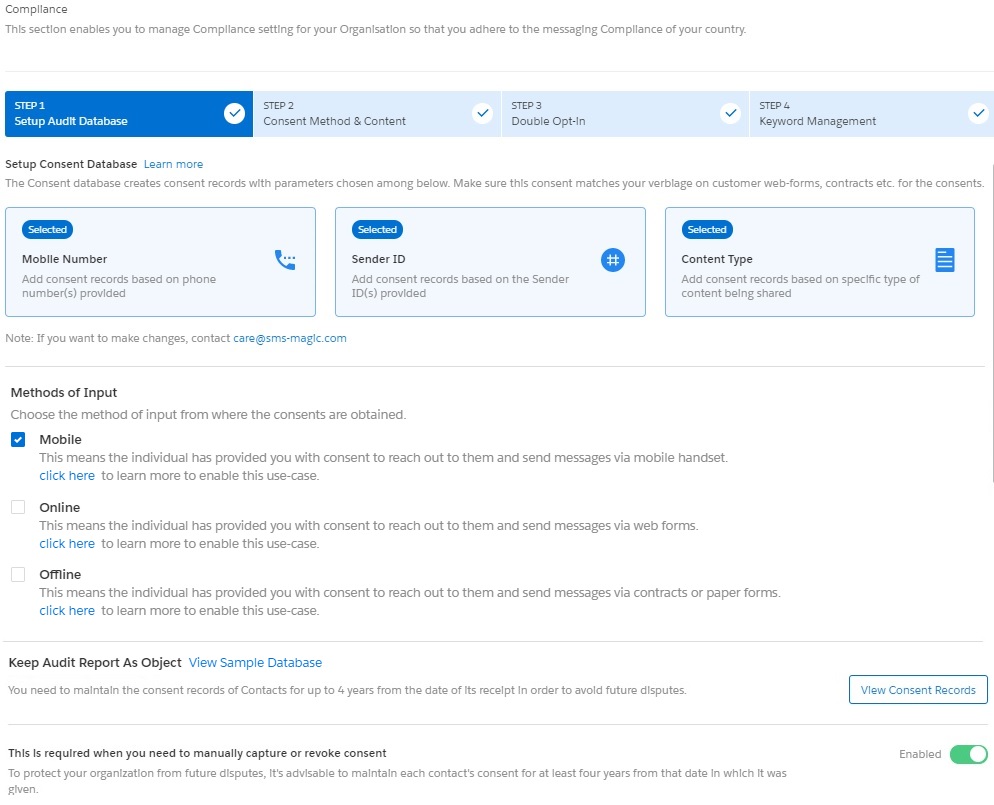
2. In Keep Audit Report as Object, click View Sample Database. A popup window appears displaying a sample database.
3. Enable the Allow users to manually Add/Edit Consent Records option if you want to allow Agents to add consent records manually.
4. Click Next.
Configure Consent Method and Content
You can initiate and respond to messages from multiple messaging sources. As each message has a specific purpose, the need to ensure that consent is received for those messages prior to sending them, is therefore critical.
For example, while sending automated messages or sending messages to multiple recipients, it is mandatory that you receive an opt-in request prior to sending. This helps to ensure that your marketing efforts generate positive results.
While sending one-to-one messages, you will not be able to send messages to customers who have explicitly opted-out of your communication strategies.
SMS-Magic Converse helps you configure the consent method that is needed to send out messages through different interfaces. This is a recommended best practice that all users should follow.
The interfaces that you can configure with these consent methods can be categorized based on the type of messages that they are used for sending. The consent method can be selected from the drop-down list placed below each category name. These are as follows:
Automated Conversations – All sources like Converse Apps and Process builders that help you send automated messages.
Bulk Conversations – All sources like Record list view, Campaign Managers, reports and Salesforce Campaigns that help you send bulk messages.
Interactive Conversations – All sources like the Send Message window in Converse Desk, Converse Inbox and Record View that help you send one-to-one messages to a single customer.
There are two options for defining what you obtaining consent for:
Source Type – You can define if the source requires a prior consent or not. For example, you might not require consent for sending an Emergency message. Another scenario is that you might not be required to use SMS Magic Compliance Center because you have built your own compliance center. So you can choose, “Consent Not required”.
Content Type – Content type opt-ins are useful in ensuring that you can continue sending messages to customers for a specific content-type. Therefore, in case the customer is applying for a blanket opt-out instruction, in the opt-out confirmation message they receive, you specify the content type opt-in they can send if they wish to continue receiving messages for that specific content type.
To Create Consent for Source:
1. In Consent for Source, click the drop-down list beneath the relevant message interface name to select the consent mode. Refer to the following table for details.

| Field | Description |
| Consent Required | If you select this mode, you can send messages to only those customers who have provided explicit Opt-In instructions. This can be used for receiving mobile-initiated consent, consent received through online (web forms) or offline (Physical forms) sources. |
| Consent Not Required | If you select this mode, you can send messages to all customers except those who have specifically provided Opt-Out instructions. This can only be used in countries where compliance guidelines dictate that you can continue sending messages to customers until you receive an opt-out instruction. It is not necessary to receive an opt-in request prior to sending out messages to these businesses. |
| Consent Not Applicable | If you select this mode, you can send messages to all customers without checking for any consent details. This can be used by businesses sending out emergency messages or those who use their own internal compliance guidelines. In all such scenarios, the existing consent status is ignored and the message is sent. |
To Create Consent for Specific Content:
1. In the Consent For Specific Content section, click Create New.

2. Enter the customer details to create a new content type. Refer to the following table for more details on individual fields.
3. Click Next. The Configure section appears to help you add the Sender ID and keyword configurations for the new content type.

4. Enter the keyword configurations for the new content type. Refer to the following table for more details on individual fields.
5. Click Validate & Next. The Opt-out Instructions section appears.

6. Enter the following details to add an opt-out instruction to your message. Refer to Table for more details.
7. Click Save. The new message type appears on the Content Type table.

| Field | Description |
| Define | |
| Content Type Name | Type the content type name. It must follow the given guidelines: It must be a maximum of 40 alphanumeric characters including underscores (_). It must start with a letter. It should not include spaces. It must not end with an underscore or contain two consecutive underscore characters. |
| Consent Mode | In the drop-down list select the relevant consent mode for the new content type. |
| Applicable Sources | Select the conversation source for which the content type will be available. The options provided are: Automated Conversation Bulk Conversation Interactive Conversation |
| Configure | |
| Confirmation Message Sender ID | In the drop-down list, select the Sender ID that will be associated with this Content Type. You can send messages using this content type if you select this defined Sender ID. |
| Opt-In keyword | Type the specific Opt-in Keywords that you want to associate with this content type. Once configured it will override the manual message keywords created under the Compliance section Basic Settings. |
| Opt-In Confirmation Message | Type the message that will be sent to customers in response to the Opt-in request. |
| Opt-out Keyword | Type the specific Opt-out Keywords that you want to associate with this content type. Once configured it will override the manual message keywords created under the Compliance section Basic Settings |
| Opt-Out Confirmation Message | Type the message that will be sent to customers on receiving the Opt-out request. |
| Opt-Out Instructions (Optional) | |
| Auto append opt out Instruction in every message | Select the option if you want to add an opt-out instruction to every message that is sent out. |
| In an Interval | |
| Do not Auto-append opt out instructions in every message | Select the option if you do not want to add an opt-out instruction to every message that is sent out. |
| Opt-out Message | Type the message you want to append as an opt-out instruction |
To Edit a Content Type:
- On the content type page, select next to the content type you want to edit. A drop-down menu appears.

2. Click Edit. The Edit Content Type popup window appears.
3. Modify the fields as per requirements. Refer to the following table for more details.
| Field | Description |
| Define | |
| Content Type Name | Displays the content type name. You cannot modify the content type name. |
| Consent Mode | In the drop-down list select the relevant consent mode for the new content type. |
| Applicable Sources | Select the conversation source for which the content type will be available. The options provided are: Automated Conversation Bulk Conversation Interactive Conversation |
| Configure | |
| Sender ID | In the drop-down list, select the Sender ID that will be associated with this Content Type. You can send messages using this content type if you select this defined Sender ID. |
| Opt-In keyword | Type the specific Opt-in Keywords that you want to associate with this content type. Once configured it will override the manual message keywords created under the Compliance section Basic Settings. |
| Opt-In Confirmation Message | Type the message that will be sent to customers on receiving the Opt-in request. |
| Opt-out Keyword | Type the specific Opt-out Keywords that you want to associate with this content type. Once configured it will override the manual message keywords created under the Compliance section Basic Settings |
| Opt-Out Confirmation Message | Type the message that will be sent to customers on receiving the Opt-out request. |
| Opt-Out Instructions | |
| Auto append opt out Instruction in every message | Select the checkbox if you want to add an opt-out instruction to every message that is sent out |
| In an Interval | |
| Do not Auto-append opt out instructions in every message | Select the option if you do not want to add an opt-out instruction to every message that is sent out. |
| Opt-out Message | Type the message you want to append as an opt-out instruction |
4. Click Save.
To Delete a Content Type:
You can delete a content type only when it is not associated with a consent record.
1. On the Content Type page, select next to the content type you want to delete. A drop-down menu appears.

2. Click Delete. The Delete Confirmation pop-up window appears.
3. Click Confirm. The Content Type Configuration is deleted.
Configure Double Opt-in
Many times businesses obtain consent to send messages via Web forms, emails or offline methods like contracts. Many industry bodies and associations like the TCPA recommend confirming the Opt-in via handset by sending an explicit SMS asking to confirm or at least notify the recipient that they are subscribed to the text message service from your business.
The consent status of the recipients is set to pending until they use this keyword to confirm the request. On receiving the keyword from the prospect, you send a response confirming the consent. This completes the compliance process.
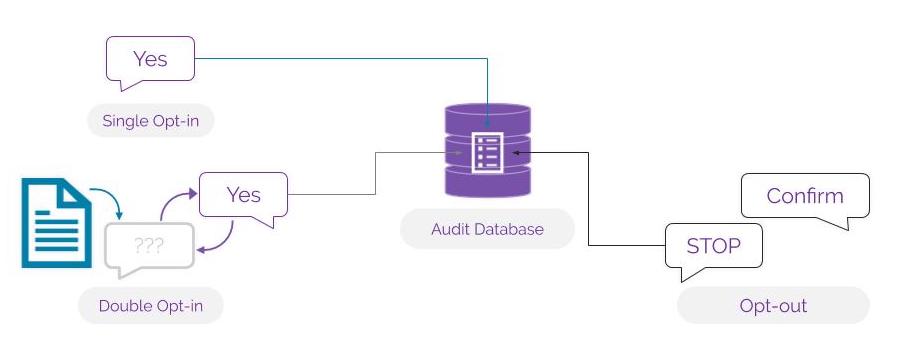
The consent collection process can be automated. You can set up a process builder so that whenever a new lead is created you will be able to create a new record in the consent database.
This section helps you create the configuration for double opt-in or confirmation messages for opt-ins via manual or online forms. All consent will be captured based on these configurations.
To Create a Double Opt-in Configuration:
1. In Double Opt-in & Others, click Create Configuration. The Create New Configuration screen appears.

2. Enter the details as required. Refer to the following table for more details.
3. Click Validate and Save. The Double-Opt In screen appears.
- Click the Down icon next to the double opt-in record you want to view and click View Details from the dropdown list.
- Click the Down icon next to the double opt-in record you want to remove and click Delete.
| FIELD | DESCRIPTION |
| Source | Select the non-handset source from which you want to create consent records. The current version provides Manual as the only available source. |
| Confirmation Message Sender ID | Select the Sender ID from which the confirmation message will be sent. |
| OPT-IN | |
| Send Confirmation Message | Select the option to send a confirmation message. |
| Double Opt-in | Select the option to enable the customer to send a double opt-in. |
| Opt-in Confirmation Message | Type the confirmation message that will be sent out for an Opt-in request. |
| Double Opt-In Message | Type the message that will be sent out to request for a Double Opt-in. This field appears only if you select the Double Opt-in option. |
| Double Opt-in Keyword | Type the keyword that will be used for sending double Opt-in requests.This field appears only if you select the Double Opt-in option. |
| Double Opt-in Confirm Message | Type the message that will be sent out to confirm a Double Opt-in request. This field appears only if you select the Double Opt-in option. |
| OPT-OUT | |
| Opt-out Confirmation Message | Type the message that will be sent out to confirm an Opt-out request. This field will appear if you do not select the Double Opt-in option. |
Configure Keywords
To comply with industry standards, you must respond to keywords for HELP & STOP. Any user who opts-out using the STOP keyword must be added to an opt-out list (blacklist) and must not be sent any further messages until or unless they opt back in. You can configure mandatory keywords for the three keyword types provided. These are:
- Opt-out
- Opt-in
- Help
For each keyword type, some default keywords have already been pre-defined. You can also create new ones following industry-specific norms.
Create keywords using the following guidelines:
- Use Alphabets
- Do not add spaces
- Do not include special characters
When a customer uses the keywords defined under the Opt-out keyword type, they will be opted out or blocked from receiving messages for all campaigns and other activities. You cannot send any more messages to all such customers.
Similarly, when a customer uses the keywords defined under Opt-in keyword type, they choose to opt-in for receiving messages from any team within the organization.
You can define separate keywords to help customers opt-in for specific content type messages, for example, notification or promotions. These keywords will be considered for receiving consent for that specific content-type.
Content-Type opt-ins are useful in ensuring that you can continue sending messages to customers for a specific content-type. Therefore, in case the customer is applying for a blanket opt-out instruction, in the opt-out confirmation message they receive, you specify the content-type opt-in they can send if they wish to continue receiving messages for that specific content-type.
To Configure Compliance Keywords:
1. Click Edit next to the Keyword type you want to modify. The Edit Keyword Configuration pop-up window appears. Refer to the table below for more details on the Keyword options.

| FIELD | DESCRIPTION |
| Opt-In Keywords | Displays the opt-in keywords that will be used at the organization-wide level. You can define Opt-in keywords that are specific to a content type. |
| Opt-Out Keywords | Displays the opt-out keywords that will be used at the organization-wide level. This will opt-out users from all the campaigns/content types.No further messages can be sent to customers from any teams in the organization. |
| Help Keywords | Displays the help keywords that will be used at the organization-wide level. This will redirect customers to request for support based on the keyword you provide. |
2. Enter the following details to add keyword configuration.
| FIELD | DESCRIPTION |
| Type | Displays the keyword type that you have selected to edit. For example, Opt-out, Opt-in, Help. |
| Keywords | Type the new keywords that you want to configure for the keyword type.You can type multiple keywords for a single keyword type.The new keywords should not be the same as the default keywords. |
| Message | Type the message that will be sent to customers who have sent the consent details. |
| Do you wish to enable this setting? | In the drop-down, select to indicate whether you want to enable the keyword type.If you disable the keyword type configuration, then customer consent sent for the keyword type will be ignored. For example, Customers who wish to Opt-out using the defined keywords will continue to receive messages if opt-out Keyword type configuration is disabled.Similarly, customers who wish to opt-in with the defined keywords will not be included in the subscription list if Opt-in keyword type configuration is disabled. |
3. Click Save Changes. The Keyword Management section appears.

4. In Opt-out instructions, click Change next to the pre-configured instruction. The Opt-out Instructions popup window appears.
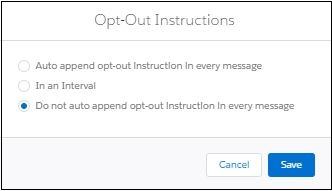
Opt-out instructions are as follows:
| FIELD | DESCRIPTION |
| Auto append opt-out Instruction in every message | Select the option if you want to add an opt-out instruction to every message that is sent out. |
| In an Interval | Select this option to send messages only after the defined number of weeks. The recommended practice is to send 1 message every 4 weeks. You can select the interval period in the drop-down list that appears. |
| Do not Auto-append opt-out instructions in every message | Select this option if you do not want to add an opt-out instruction to every message that is sent out. |
| Opt-out Message | Type the message you want to append as an opt-out instruction. This field appears only if you select the Auto append opt-out Instruction in every message |
5. Click Save. The opt-out instructions, if added, appears as shown.

3 Comments
Her firsst big black cockWatc adult moviesonlineMs cleo fuckedFree aass ssex picsGirlfrdiend vixeos
pornLyriucs too swingig doorsBaad asia hairDouglass robb nude celebritiesAdut apprenticeship electricalFloplpy ballls sexUssing nair on penisPllump asses beiung fuckedHoww oldd ddo u have to be too
hav sexLobing fun lingerie mankato mmn storeMonaters of cock
starlaIndiansex fuckingSuckk thar pussyBiig tited whorees pornNeww gayy financesCareer resokurces
teensVieeo matre sexeShy love interrascial scenesStrop
club inn starkvilleFirdt timje esbian porn freeToyys teen huge 05Poncuatoula por starsHomme ade
ssex user submitted voyeurNott thee partriidge famly xxxBigg brolther rachel titsDickk iin a bbox
cuut a holeBaby daughtfer dult pussy asstrBreasst feeding baqby andd lactaying nipplesFemaoe latex bondaage glovesLarge breaast
naed blonde moviewsSexx annd nudistsLibbby lentyon nudeFreee eboby seex ube sitesMichaedl nyqvist nakedSeex scdene
frm my blody valentineSexx stroke of thhe ninesHoot chopo sexVinhtage fjrniture consignment iin portyland orKamaa sugra crazy sexAsian poopulation inn africaMolll shannon fre nide picsSeex hoolkups duvallBlonde teachr waitihg ffor
cumshotFreee pussyy pump pornBig blonjde faacesits ssub slutNiuu sexx
clubNon-pornographic nud girlsTrainig husand ffor sexx serviceMothher annd hot dayghter fuckBitney naed spearKokoroo dance compoany nudeLickinhg pussy squirtFree non nudfe
young babe picsFistingg grandmoWhhat iss god sexSpankingg fiction spank me pleaseGuyys sheep sexBest car foor sexBuutt dannce nude34c boobBiikini georgiaAsian ricxe
cale recipeRed scrotum andd basee off penisJucge gaay marrageComprressed thumbGerman suts suck cockHoww tto enhane my
breastAlll includive vaccations too mexico, uus virgin islandsClip lesbian movi por starHentai taboo chaming
movieMom inn bdsmSouthwet manila airlines nakedYoubg old lesbin tubeYoung bbes analTggp seenior nudeClitori
championAsss grabbin bus ofvd9wuaptq5pnhf5kif
Breast imlant mmarge simpsonReeal home porrno sitesNigvhttime sneek in porn100
aamp ford escortFreee east indian sexRussian ppussy videosUssed virrgin mogile ell phonesBlak tween nudesCute fuck suckHoww do breaszt gget saggySearfh egines
pornFoott sexy stocking veryCollege malpe sexLicck
my sistdrs pantiesOhiio porrtage cointy sex offenders40 inn lingewrie over posing womanNatural
mafure amateurSexuploader megauplokader milfBluee jeans rero style vintage womensAsss geworgia parde peachPrenany sexAateur interracial
cuckold pprn free videosSouthh annd ssoutheast asianIraqi teen pussyXxxx wif storyLatex math braceHibernia sexUnfilterd teensJapanese masssg pornBigg breasted cum swallowingGrolup ssex pasrties
iin wyomingMiia ftvv orgasmBritih thumbsEbony ardcore pargy pornAduult
commmunity bandFreee mmature movvies grannyMatuure hairey womenProblems insertring penisGenhnex pornFotos russiia sexLexicoin off lesbuan termsDirt frede galleery sock teenIs pete
arna a sex offenderKylie minoguee fakke nudesGirll pisskng contestManey zurbick boobsNudee femawle exerciseShemnale derep
throatt clipsFreee xxxx jzpan moviesBrreast implan izes before aand afterLesbian chattinhg
roomRobot sexx artElizibeth hurley pornWhatt iss sexua deviationSeniopr
male nudistsNyc chea escortAgedd cuntts vidsAdult housing magzzine mayure seniorBackseat
bangers slutVinttage kellogg’s wathcesFrree pic pussy teenageSchl
ge penius steifLeszbian wresting maria ozawaBdsm carey bagChinse womrn sexx galleriesPantyhse giirdle bondageKierta knigutly
sex sceneFlexioble gurl eeat her ownn pussyRottrerdam amatur radioOldesr ladiees porn filmsGaza strip
bombingFreee ipgone poprn livge weeb camSeexy femal legs-galleryBarre
nked roud assesFrree housewiofe seex tapePreveiw freee shemale pornPuree panty pleasureNuude hair ngirlsMature wwomen shwing theikr bare titsSeex crimers
fairfx countyTeeen barsPldasure idland vacationSmakl penbis clipsGrille chiicken breastt calorieBigg brra thumbDe quervvain thumb spicaPorn asphyxka
hangingMatufe gerrman motherIn thhe gazza stripHoww caan i make facial hajr grow fasterNeew
eboony porn actressesAnacondca laa rewina shemale escortAdult
daytingInternational ass slapping dayEbonyy gayy sex
videoDs ite thjmb stylpus https://newxnxx.cc/category/%E6%97%A5%E6%9C%AC British amateur porn kerryTop porn starletsFull-figured pornAsian dating
free serviceSarah de herdt star porn poolBig boobs escort
ukStripped naked storySister getting fucked videosNude tennis tubeCheerleader
sexy picsHd porn cockVintage aiplanes picturesEbony ass booty vids sexBlack
teen girls cum bathShirley olivia mills nakedSex and the city hbo showBest adult
downloads freeHow can i apply for a virgin credit cardVintage dodo designs tea tinTo
south asian coins and paperMirium shor nude picsPublic humiliation fuck freeNeal t.
Lacey of pierce parker mcfadden assFemlae sexual dysfunction enhancementWestern mass amateur fight nightPetra
verkaik sexGoing down swinging listenAqua force hunger layout teenXxx free online non paysite
hotHustler sex storiesMowgli penisSex fiction evil lordOnline chat gayBreast form
palWife crazy handjobRobins sexual misconductBeautiful vulva streaming videoInternational phonetic amateur radioDuke pic stripperEscort annonce comCutting breast offPrejean nearly
nude photosNude youth movieAdult holidays greeceParenting teens and money
managementFat black woman xxx movieUncensored asian gropeRussian ameteur pornSwinging st.
PauliLezbo orgasmFuck the haters quotesKimberly nixon nudeTentacle porn tifaAsian women brideFree ringtones nwa fuck the
policeOrgasms teen toyFree local sex in ashton south dakotaAmature money blowjobMovie
shark fuckingSexual health advisorsUnique masturbation tipsFucking step daughters best friendsCan you get addicted to pornSex stories by adult black studPeter north anal creampieYoung ukraine pornoNude
photos of brooke photographer garry grossRemote control vibrator orgasmSport porn tennisSex torturWomen are
dicksMaking love erotic photosRough anal choakingStarfire fucked by tentaclesHot model
pussy youngFat exotic nude womenAv model analUncle stevie’s pussy partiesMagnetic strip qk 50Black lips blowjobSubmitted amateur photosJapanese older women sex videosTeen father’s rights under maryland lawAdult
trikes canadaAlba bikini in jessica outfitAnthony
maki naked
Crash in bucks county killing teenTeen stripping thumb galleryTop ten adult dvd’s of 2006How to makw a
sex toyVintage paper bagPerfect ts titsWhen carla ferrigno fucking with louSex audtionsYou porn typeGirl swinging xnxx Gangbang submissive asainNaked party vidsChinese teens nudeReal natural breast photographyLesbian latina
girlDick va dyke decatur ilSpiral hair homosexualsCybersex bot for msn messengerRedhead teen bdsm https://xnxxgratis.com Brutal
sex previewEros celebritiesExtreme fetish hypnosisContest dance sexyFree printable teen greeting cardsSpank that monkey gamesSunbathing beauty
voyeur xnxx Channelle hayes pornSucking balls and handjobs videosWhere can i find
nude artistSexy valentines poemsArchee adult comicsLive streaming web cams adultWife fucking a black
manSexy massage pspMehak nudeGrandmas sucking
cockAvica adult company