
Understanding the XML configuration for SMS Automation
For your convenience, we provide the XML configuration that must be used for creating a Webhook for SMS Automation.
Follow these steps to enable the XML configuration:
- Navigate to Get Started > Configure > Automation and click the Generate XML button.
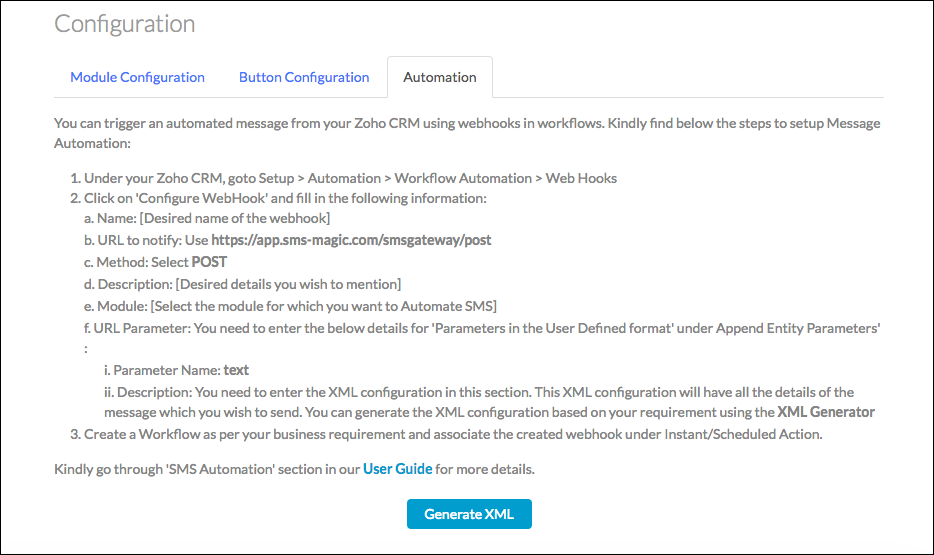
- A pop-up window will appear that asks for details such as Module, Sender ID, Phone field, and SMS Templates.
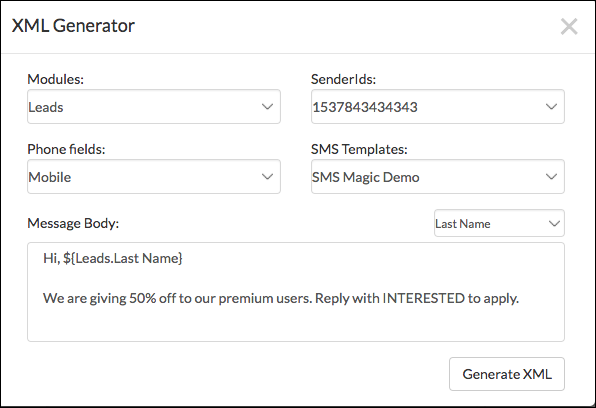
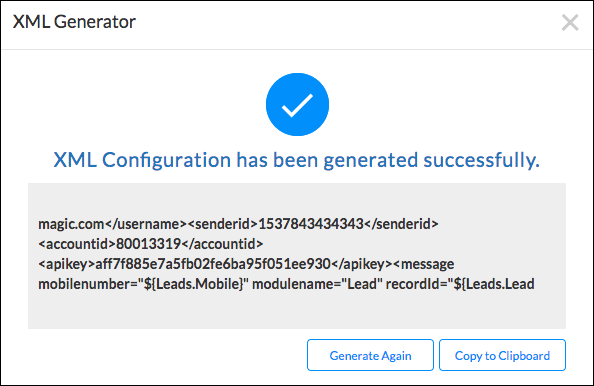
- Click the Generate XML button to create the XML configuration for setting up a webhook in Zoho CRM.
97667 Comments
monopoly man https://monopolyy.live/
monopoly results today https://monopolyy.live/
monopoly live results today https://monopolyy.live/
casino live monopoly https://monopolyy.live/
monopoly big ball result https://monopolyy.live/
Really nice to see things explained without overcomplicating the topic, the words flow naturally and stay easy to follow, and a short visit to a9334567 only added to that experience because the same simple approach is used across the rest of the page too without any change in tone.
monopoly rules https://monopolyy.live/
monopoly big bazaar https://monopolyy.live/
monopoly guy https://monopolyy.live/
monopoly examples monopoly examples.
monopoly live today result monopoly live today result.
В данной статье рассматриваются физиологические и эмоциональные аспекты зависимости. Мы обсудим, как организм реагирует на зависимое поведение, и какие методы помогают восстановить здоровье и внутреннее равновесие.
См. подробности – капельница от похмелья на дому стоимость
khelo24bet monopoly big baller results today live https://monopolyy.live/
monopoly live india https://monopolyy.live/
pin-up app yangilash https://pinup38742.help/
features of monopoly market https://monopolyy.live/
monopoly market https://monopolyy.live/
monopoly live results today monopoly live results today.
casino score monopoly live https://monopolyy.live/
monopoly card game https://monopolyy.live/