
Understanding the XML configuration for SMS Automation
For your convenience, we provide the XML configuration that must be used for creating a Webhook for SMS Automation.
Follow these steps to enable the XML configuration:
- Navigate to Get Started > Configure > Automation and click the Generate XML button.
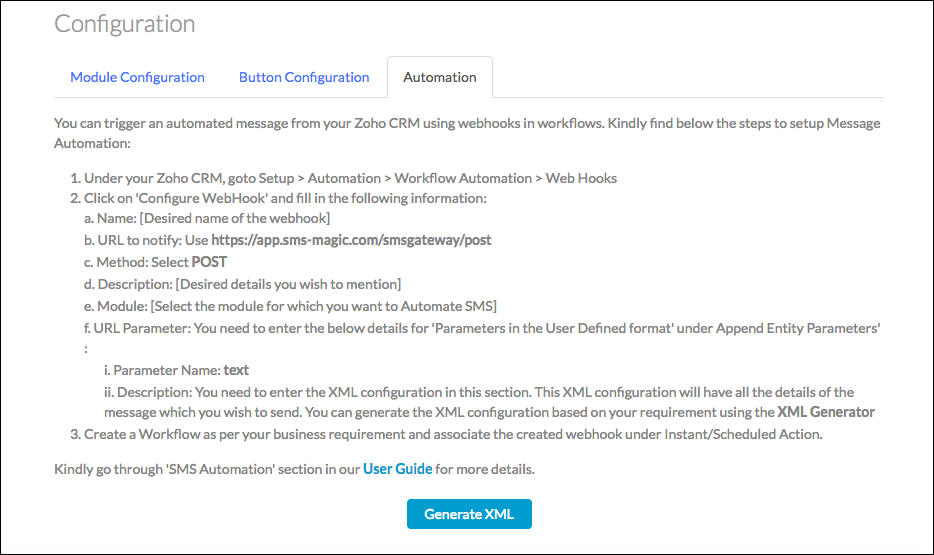
- A pop-up window will appear that asks for details such as Module, Sender ID, Phone field, and SMS Templates.
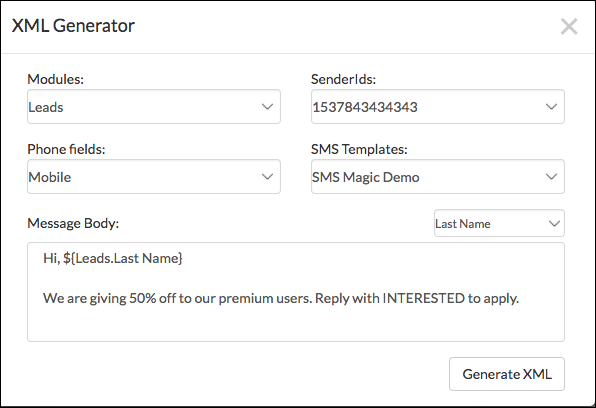
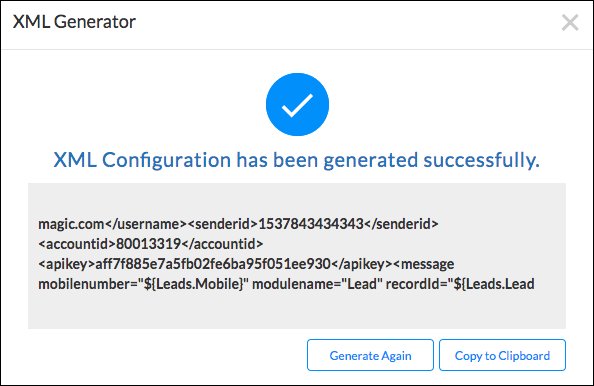
- Click the Generate XML button to create the XML configuration for setting up a webhook in Zoho CRM.
219443 Comments
Этот медицинский обзор сосредоточен на последних достижениях, которые оказывают влияние на пациентов и медицинскую практику. Мы разбираем инновационные методы лечения и исследований, акцентируя внимание на их значимости для общественного здоровья. Читатели узнают о свежих данных и их возможном применении.
Выяснить больше – наркологическая помощь на дому
1win promocion por registro http://www.1win38940.shop
В этой статье мы подробно рассматриваем проверенные методы борьбы с зависимостями, включая психотерапию, медикаментозное лечение и поддержку со стороны общества. Мы акцентируем внимание на важности комплексного подхода и возможности успешного восстановления для людей, столкнувшихся с этой проблемой.
Узнать напрямую – тест на наркотики цена