
Understanding the XML configuration for SMS Automation
For your convenience, we provide the XML configuration that must be used for creating a Webhook for SMS Automation.
Follow these steps to enable the XML configuration:
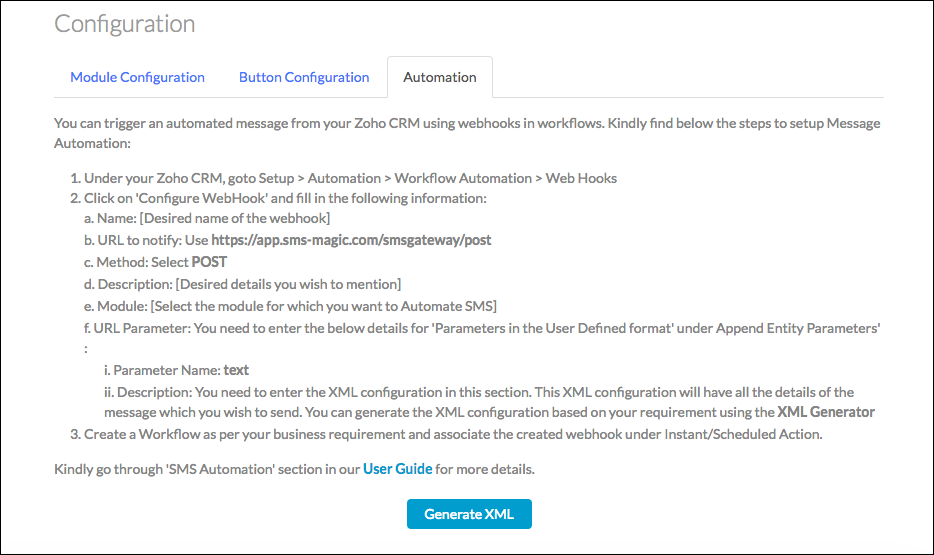
- Navigate to Get Started > Configure > Automation and click the Generate XML button.
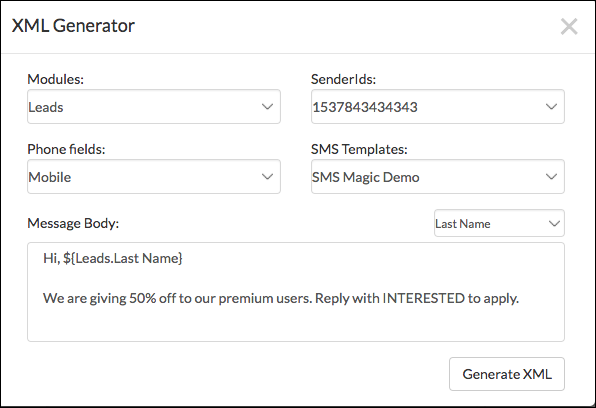
- A pop-up window will appear that asks for details such as Module, Sender ID, Phone field, and SMS Templates.
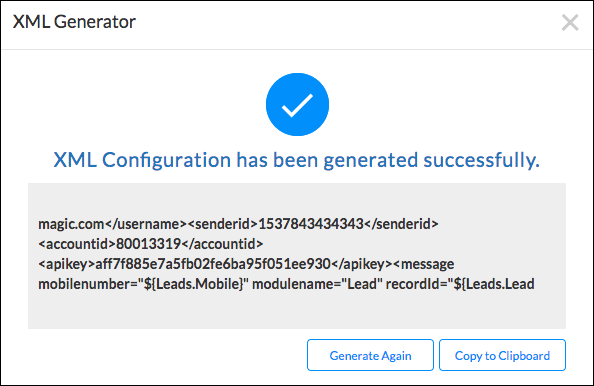
- Click the Generate XML button to create the XML configuration for setting up a webhook in Zoho CRM.
135071 Comments
Gram na 888starz raczej dobre pare miesiecy i stwierdzilem, ze rzuce tu pare slow. Nie bede sciemnial — trafilem tu przez znajomego i nie zaluje. W Polsce nie ma zbyt wielu sensownych opcji, wiec kazde takie zawsze sprawdzam dokladnie.
Najbardziej krece sloty i jest w czym wybierac. Spokojnie ponad trzy tys. gierek, od Pragmatic Play po NetEnt, Play’n GO oraz Yggdrasil. Klasyki typu Gates of Olympus oraz Book of Dead masz na wyciagniecie reki, choc prawde mowiac zwykle wracam do jednego czy dwoch ulubiencow. Ladowanie dziala gladko na mobilce.
Jesli wolisz prawdziwego krupiera — obsluguje to Evolution, na zywca, a jeszcze rozne game show typu Crazy Time. Wciaga bardziej niz myslalem. Wplaty i wyplaty — wrzucalem przez Visa i Skrill, obsluguje tez krypto. Pierwszy raz mialem na koncie w jakies kilka godzin, na e-wallecie sa najszybsze. Warto zerknac na biezace bonusy na 888starz apk download jak cos, bo sie zmieniaja.
Powitalny wyglada przyzwoicie — jest spory procent od wplaty i do tego jakies 150 free spinow. Ruch to 40x, i to no w normie, ale jak zawsze czlowiek musi ogarnac zasady. Prog to grosze, rejestracja poszla w doslownie pare minut. Appka tez jest i chodzi ok, instalka poza sklepem ze strony.
Zeby nie bylo za rozowo — czat potrafi mieli wolno, zwlaszcza wieczorami. KYC delikatnie zirytowala, choc to chyba kwestia regulacji to norma. W sumie — zostaje na razie, opinie na forach sa rozne, wiec zobacz na spokojnie, bez szalenstwa na start.
Екатеринбург, всем привет Голова раскалывается Поилки и таблетки не помогают Короче, врачи приехали и поставили систему — капельница от запоя с витаминами Приехали через 30 минут В общем, не потеряйте контакты — прокапаться от похмелья https://alkogolizm.kapelnicza-ot-pokhmelya-ekaterinburg.ru Не мучайтесь рассолами Перешлите тем кто в такой же ситуации
Od jakiegos czasu ogram 888starz chyba z pare tygodni i stwierdzilem, ze wrzuce swoje wrazenia. Nie bede sciemnial — trafilem tu przez znajomego i zostalem na dluzej. U nas w Polsce ciezko o porzadnych miejscowek, wiec cos takiego od razu testuje na spokojnie.
Najbardziej lece w automaty i jest w czym wybierac. Jest chyba z trzy tysiace tytulow, od Pragmatic Play po NetEnt, Play’n GO czy Yggdrasil. Klasyki typu Sweet Bonanza i Book of Dead sa bez szukania, ale prawde mowiac zwykle wracam do paru swoich ulubiencow. Grafika dziala gladko na mobilce.
Dla tych co lubia klimat kasyna na zywo — sa stoly od Evolution, na realnych ludziach, plus rozne game show w stylu Crazy Time. Potrafi wciagnac na calego. Co do kasy — robilem BLIK-a i crypto, obsluguje tez Mastercard. Pierwsza wyplate dostalem w jakies kilka godzin, Skrillem sa najszybsze. Jesli komus zalezy na swieze oferty u 888starz no deposit bonus przed rejestracja, regularnie sie aktualizuje.
Pakiet powitalny wyglada przyzwoicie — jest spory procent od wplaty plus jakies 150 zakrecen. Wager to 40x, co no jest standardem, choc jak wszedzie trzeba przeczytac warunki. Prog niewielki, zapis zajela mi doslownie pare minut. Appka istnieje i jest znosna, apk z ich stronki.
Nie wszystko jest idealne — support potrafi mieli wolno, zwlaszcza wieczorami. Sprawdzanie dokumentow delikatnie wkurzyla, ale widocznie przy licencji to norma. Tak po calosci — zostaje na razie, zdania w sieci bywaja mieszane, wiec wyrob sobie wlasne, na malych stawkach.
Na 888starz siedze chyba jakies pare miesiecy i stwierdzilem, ze wrzuce swoje wrazenia. Tak z reka na sercu — trafilem tu przez znajomego i jakos zostalem. W Polsce ciezko o porzadnych miejscowek, wiec cos takiego zawsze testuje na spokojnie.
Najbardziej siedze w slotach i wybor jest ogromny. Jest chyba z dwa tysiace automatow, poczawszy od Pragmatic Play przez NetEnt, Play’n GO czy Yggdrasil. Standardowe Sweet Bonanza oraz Book of Dead sa na wyciagniecie reki, choc szczerze najczesciej wracam do paru swoich ulubiencow. Ladowanie dziala gladko nawet na slabszym telefonie.
Dla tych co lubia klimat kasyna na zywo — sa stoly od Evolution, na realnych ludziach, a jeszcze te cale teleturnieje typu Crazy Time. Potrafi wciagnac niesamowicie. Wplaty i wyplaty — robilem BLIK-a i crypto, obsluguje tez Bitcoinem. Pierwszy raz dostalem w jakies pol dnia, e-portfele sa najszybsze. Mozesz podejrzec swieze oferty u 888starz kod zanim sie zapiszesz, regularnie sie aktualizuje.
Pakiet powitalny wyglada calkiem niezle — dostajesz do 1500 euro plus paczke zakrecen. Obrot wynosi 40x, co no nie jest tragedia, ale jak wszedzie warto doczytac regulamin. Prog to grosze, rejestracja poszla w doslownie pare minut. Appka istnieje i chodzi ok, apk ze strony.
Nie wszystko jest idealne — obsluga potrafi kaze czekac, zwlaszcza w nocy. KYC troche mnie wkurzyla, choc widocznie z powodu licencji to norma. Ogolnie — jestem raczej zadowolony, zdania na forach sa rozne, dlatego wyrob sobie wlasne, na malych stawkach.
Quietly impressive in a way that does not announce itself, and a stop at builddigitalgrowthpaths extended that quiet impressiveness, the kind of quality that emerges through sustained attention rather than first impressions is the kind I trust more deeply and this site has been earning that deeper trust across multiple sessions over time consistently.
Na 888starz siedze chyba jakies kilka miesiecy i w koncu postanowilem, ze napisze co i jak. Szczerze mowiac — zapisalem sie glownie dla bonusu i jakos zostalem. Jako gracz z Polski nie ma zbyt wielu sensownych opcji, wiec cos takiego zawsze testuje na spokojnie.
Przede wszystkim krece sloty i wybor jest ogromny. Spokojnie ponad trzy tys. tytulow, poczawszy od Pragmatic Play po NetEnt, Play’n GO oraz Yggdrasil. Standardowe Sweet Bonanza oraz Book of Dead sa na wyciagniecie reki, choc szczerze najczesciej siedze na jednego czy dwoch tytulow. Plynnosc dziala gladko tez na kompie.
Jak ktos woli prawdziwego krupiera — sa stoly od Evolution, na zywca, plus te cale teleturnieje w stylu Crazy Time. Zjada czas niesamowicie. Wplaty i wyplaty — wrzucalem przez BLIK-a i crypto, da sie tez Mastercard. Pierwszy raz dostalem w niecale kilka godzin, e-portfele ida najszybciej. Mozesz podejrzec swieze oferty u 888starz download old version jak cos, bo to sie rusza.
Pakiet powitalny prezentuje sie przyzwoicie — dorzucaja do 1500 euro i do tego jakies 150 zakrecen. Ruch to x40, i to no jest standardem, choc jak zawsze warto doczytac regulamin. Wejscie niewielki, rejestracja zajela mi jakies chwile. Apka mobilna tez jest i chodzi ok, apk ze strony.
Nie wszystko jest idealne — czat czasem odpisuje z opoznieniem, szczegolnie w nocy. Weryfikacja konta tez mnie zmeczyla, ale rozumiem, ze kwestia regulacji to norma. Tak po calosci — zostaje na razie, zdania na forach bywaja mieszane, dlatego wyrob sobie wlasne, na malych stawkach.
Gram na 888starz raczej jakies pare tygodni i w koncu postanowilem, ze wrzuce swoje wrazenia. Tak z reka na sercu — zapisalem sie glownie dla bonusu i nie zaluje. U nas w Polsce nie ma zbyt wielu porzadnych miejscowek, wiec cos takiego od razu testuje na spokojnie.
Najbardziej krece sloty i jest w czym wybierac. Jest chyba z trzy tys. gierek, od Pragmatic Play po NetEnt, Play’n GO oraz Yggdrasil. Standardowe Sweet Bonanza i Book of Dead sa bez szukania, ale szczerze zwykle siedze na paru swoich ulubiencow. Ladowanie jest ok na mobilce.
Jesli wolisz klimat kasyna na zywo — sa stoly od Evolution, na realnych ludziach, a jeszcze rozne teleturnieje typu Crazy Time. Wciaga na calego. Co do kasy — robilem Visa i Skrill, mozna rowniez Bitcoinem. Pierwszy raz mialem na koncie w niecale kilka godzin, e-portfele sa najszybsze. Mozesz podejrzec biezace bonusy na 888starz global app jak cos, bo sie zmieniaja.
Pakiet powitalny jest calkiem niezle — jest do 1500 euro oraz paczke darmowych spinow. Wager stoi na 40x, co szczerze w normie, ale jak wszedzie trzeba przeczytac warunki. Prog niewielki, zalozenie konta poszla w jakies pare minut. Apka mobilna dziala i chodzi ok, sciagalem apk ze strony.
No i teraz lyzka dziegciu — czat bywa ze kaze czekac, szczegolnie w nocy. Sprawdzanie dokumentow tez mnie wkurzyla, choc widocznie kwestia regulacji to norma. Ogolnie — zostaje na razie, opinie na forach sa rozne, dlatego wyrob sobie wlasne, bez szalenstwa na start.
Помощь может включать консультацию, детоксикацию, стационар и дальнейшее сопровождение по показаниям.
Изучить вопрос глубже – врач вывод из запоя анапа
Соблюдаем конфиденциальность, бережно общаемся с пациентом и его близкими на каждом этапе.
Узнать больше – вызов врача нарколога на дом
Gram na 888starz raczej z pare tygodni i w koncu postanowilem, ze napisze co i jak. Nie ma co owijac w bawelne — dorwalem link na jakims forum i jakos zostalem. W Polsce ciezko o sensownych opcji, wiec kazde takie od razu testuje na spokojnie.
Przede wszystkim lece w automaty i wybor jest ogromny. Jest chyba z trzy tys. gierek, od Pragmatic Play po NetEnt, Play’n GO czy Yggdrasil. Standardowe Sweet Bonanza i Book of Dead sa na wyciagniecie reki, choc szczerze najczesciej wracam do jednego czy dwoch tytulow. Plynnosc nie tnie nawet na slabszym telefonie.
Jak ktos woli live — jest sekcja od Evolution, z prawdziwymi krupierami, do tego rozne game show w stylu Crazy Time. Potrafi wciagnac bardziej niz myslalem. Co do kasy — robilem Visa i Skrill, mozna rowniez Bitcoinem. Pierwszy raz mialem na koncie w jakies kilka godzin, e-portfele ida najszybciej. Jesli komus zalezy na biezace bonusy na 888starz official zanim sie zapiszesz, bo to sie rusza.
Powitalny jest przyzwoicie — dorzucaja do 1500 euro i do tego jakies 150 darmowych spinow. Ruch to x40, i to szczerze nie jest tragedia, choc jak wszedzie czlowiek musi ogarnac zasady. Wejscie jest niski, zapis poszla w jakies dwie minuty. Aplikacja na androida tez jest bez wiekszych zgrzytow, sciagalem apk z ich stronki.
No i teraz lyzka dziegciu — czat bywa ze kaze czekac, zwlaszcza pod obciazeniem. Sprawdzanie dokumentow troche mnie zmeczyla, ale rozumiem, ze z powodu licencji to norma. Tak po calosci — zostaje na razie, zdania na forach sa rozne, dlatego wyrob sobie wlasne, zanim wrzucisz kase.
Снятие запоя – это не только прекращение приема спиртных напитков, но и целый комплекс мероприятий, включающий очищение и восстановление организма, а также нормализацию общего состояния больного. В современных условиях наркологическая клиника может предложить вывод из запоя на дому, лечение запоя в стационаре, капельницу, детоксикацию, медикаментозный курс, психологическую помощь, кодирование, реабилитацию и дальнейшее сопровождение семьи. Такой подход позволяет не просто вывести человека из тяжелого периода, а определить причины зависимости, подобрать индивидуально эффективное лечение и снизить вероятность повторного срыва.
Подробнее можно узнать тут – вывод из запоя дешево в анапе